

Written by:
Team Mirus
-
Mirus Australia
On the 8th of April 2022, the Department of Health released the results of the completed AN-ACC shadow assessments on the My Aged Care platform.
Our resident data expert, Tyler Fisher, has put together his quick tips for downloading the AN-ACC shadow assessments into an excel report format, in bulk.
Let us know if this has been helpful!
Step 1
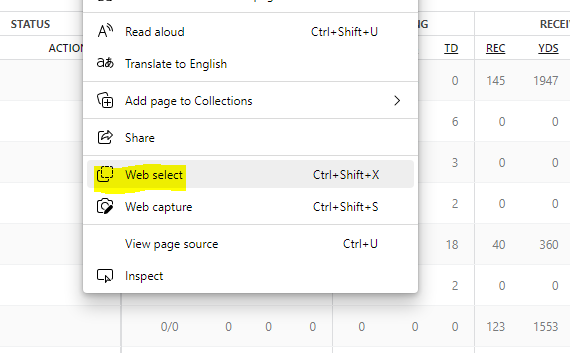
To Copy/Paste the My Aged Care portal assessment data, MS Edge has a function called “Web Select”. Reduce the page size to fit the whole table in the window. Right click and select web select.
Click on image to expand
Step 2
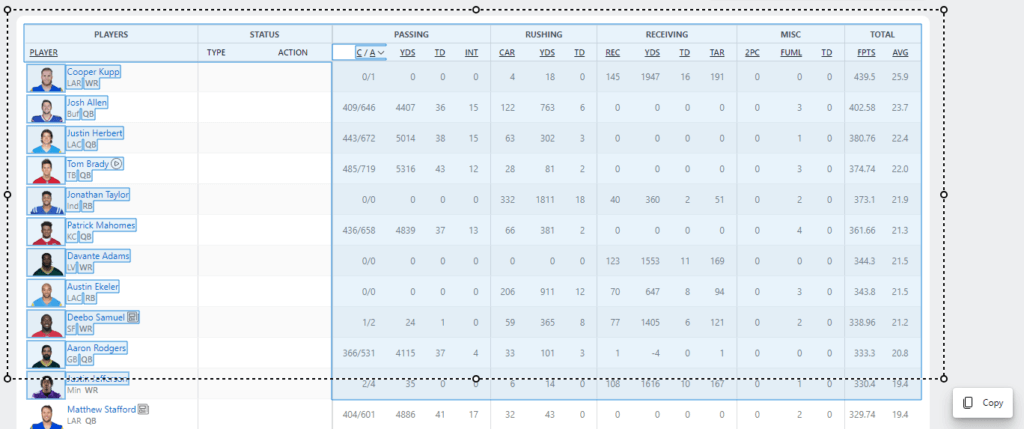
Highlight all the data. This should allow you to paste into Excel while retaining the columns’ structure.
Click on image to expand